


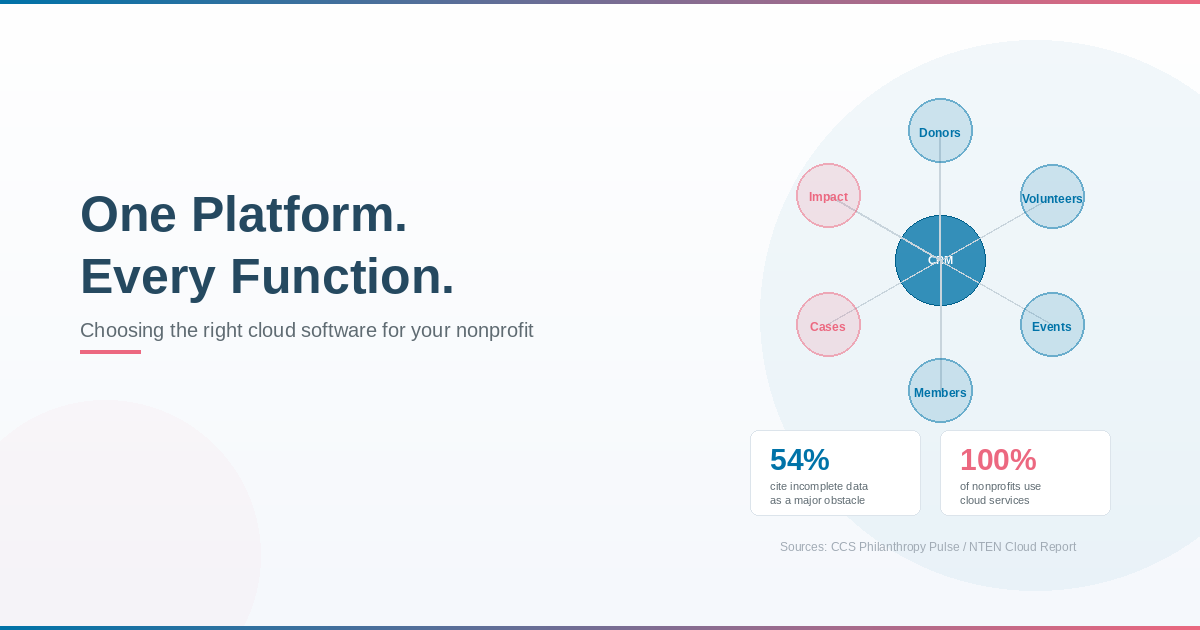
If your nonprofit is still juggling spreadsheets, disconnected tools, and manual processes, you are not alone. Many organizations reach a point where their technology can no longer keep up with their mission. Donor data lives in one system, volunteer information in another, event details in a third, and reports are assembled by hand from all of the above.
The good news is that cloud-based software has made it far more accessible and affordable for nonprofits of every size to bring their operations together in one place. You no longer need a dedicated IT team or a massive budget to use the same kind of technology that powers large organizations.
This guide will help you understand what cloud-based nonprofit software actually does, why it matters, and how to choose the right solution for your organization.
Why Technology Matters More Than Ever for Nonprofits
Nonprofits are under more pressure than ever to do more with less. A 2025 NonProfit PRO study found that 81% of organizations struggled to raise enough funds to cover all of their costs. At the same time, donors expect seamless digital experiences, personalized communication, and clear proof of impact.
Yet many nonprofits are working with outdated tools that make meeting these expectations unnecessarily difficult. Research from Unit4 found that roughly three-quarters of nonprofit leaders cite siloed data, resistance to change, lack of technical expertise, and limited training capacity as the primary barriers to digital transformation.
The result is what researchers call a “6-to-18 month lag behind the technology curve,” where staff spend their time managing disconnected systems rather than focusing on improvements.
The right software does not just make your team’s life easier. It directly affects your ability to engage donors, retain supporters, manage programs, and demonstrate your impact.
What Cloud-Based Software Actually Means (In Plain Language)
If the terms “cloud-based” and “SaaS” sound like tech jargon, here is the simple explanation.
Cloud-based software runs on the internet instead of on a computer or server in your office. You access it through a web browser, just like checking your email or logging into your bank account. There is nothing to install, no hardware to maintain, and updates happen automatically.
SaaS stands for “Software as a Service.” Instead of buying software outright and installing it on your computers, you pay a monthly or annual subscription fee to use it. It is the same model as Netflix or Spotify, but for your nonprofit’s operations.
According to TechSoup, cloud-based tools empower nonprofits to do more with less by automating tasks, simplifying workflows, and providing access to valuable data in real time. NTEN’s State of the Nonprofit Cloud report found that 100% of surveyed nonprofits use at least two cloud services, up from 80% in their previous survey.
Here is what that means in practical terms for your nonprofit:
- No expensive hardware. You do not need servers, IT closets, or a tech staff to keep them running. The software provider handles all of that.
- Access from anywhere. Your team can work from the office, from home, or from the field. All you need is an internet connection.
- Automatic updates. Security patches and new features are applied automatically, so you are always running the latest version without lifting a finger.
- Scales with you. As your organization grows, your software grows with you. You do not need to buy new equipment or start over with a new system.
- Lower upfront costs. Instead of a large capital investment, you pay a predictable monthly or annual fee that fits into your operating budget.
The Problem with Disconnected Tools
One of the biggest technology challenges nonprofits face is the “tool for every task” approach. Over time, organizations accumulate separate systems for email, donations, volunteer scheduling, event registration, case management, and reporting. Each tool may work fine on its own, but together they create data silos, duplicate work, and blind spots.
A 2025 survey by the CCS Philanthropy Pulse Report found that 54% of nonprofits identify incomplete or inaccurate data as a major obstacle to maximizing their donor information. When your donor data lives in one system and your program data in another, it is nearly impossible to answer basic questions like: “Which donors also volunteer?” or “What is the lifetime value of supporters who attended our gala?”
The biggest operational change happening in nonprofit technology right now is a shift toward integrated platforms, with organizations moving away from disconnected tools and consolidating around modern CRMs that eliminate manual data transfer and enable real-time insights.
What Good Nonprofit Software Should Do
Not all software is created equal, and not every tool is designed with nonprofits in mind. Here are the key capabilities to look for when evaluating cloud-based solutions for your organization.
Your software should give you a complete picture of every supporter: their giving history, communication preferences, event attendance, volunteer activity, and engagement over time. This is the foundation for personalized outreach, better retention, and smarter fundraising decisions.
With only 19% of first-time donors returning to give again, the ability to track and nurture donor relationships is critical. Personalized email subject lines are 26% more likely to be opened, and personalized calls to action convert 202% better than generic ones. This level of personalization is only possible when your donor data is complete and accessible.
If your organization relies on volunteers, your software should help you recruit, schedule, communicate with, and track the hours and impact of your volunteer base. The 2025 M+R Benchmarks Study found that direct service volunteers increased 6% and advocacy volunteers grew 11% in 2024. Managing that growth without a proper system quickly becomes unsustainable.
From galas to community workshops to virtual fundraisers, your software should handle event registration, ticketing, attendee tracking, and post-event follow-up. A 2025 survey found that 77% of nonprofits met or exceeded their event fundraising goals, but nearly half (46%) of organizations that did not hold events raised less than budgeted. The right software makes planning and managing events far more efficient.
Donors and funders increasingly expect clear evidence of outcomes, not just activity. A survey of 355 nonprofit decision-makers found that 76% identified impact measurement as a top priority, yet only 29% felt they were effective at demonstrating outcomes. Built-in reporting tools help you track program results and share them with stakeholders without manually compiling data.
Membership and case management
If your organization manages memberships, client services, or case files, your software should support those workflows as well. Having everything in one system means your team can see the full picture of every person your organization serves.
Financial transparency
Budget tracking, grant reporting, and financial summaries should be accessible and easy to generate. The Give.org Donor Trust Report found that how a charity spends its money is the number one accountability priority for donors.
How to Choose the Right Software: 6 Questions to Ask
Selecting nonprofit software can feel overwhelming, but it comes down to asking the right questions.
1. Does it cover what we actually need?
Make a list of your organization’s core functions: donor management, volunteer coordination, events, memberships, case management, reporting. Look for a solution that handles as many of these as possible in one integrated system, rather than requiring you to bolt together multiple tools.
2. Is it easy for our team to learn and use?
The most powerful software in the world is useless if your team cannot figure out how to use it. Look for an intuitive interface, good training resources, and responsive customer support. Research shows that training is often an afterthought at nonprofits, resulting in inconsistent usage and low adoption rates.
3. Will it grow with us?
Choose software that can scale as your organization grows. You do not want to go through the pain of migrating to a new system in two or three years because you outgrew your current one.
4. Is our data secure?
Donor data security is not optional. Nearly 69% of donors worry about their information being hacked, and 80% would stop giving after a data breach. Ask about encryption, access controls, data backup practices, and compliance with privacy regulations.
5. Does it integrate with what we already use?
If you use specific tools for email marketing, accounting, or payment processing, make sure your new software can integrate with them. Seamless integration eliminates duplicate data entry and keeps your information consistent across systems.
6. What does the total cost look like?
Look beyond the monthly subscription price. Consider implementation costs, training expenses, and any add-on fees. Also ask about nonprofit pricing or discounts. Many cloud-based providers offer reduced rates for nonprofit organizations. TechSoup also acts as a bridge between technology companies and eligible nonprofits, offering discounted software licenses and consulting through corporate partnerships.
The Role of AI in Nonprofit Software
Artificial intelligence is increasingly built into modern nonprofit software, and it is worth understanding what it can realistically do for your organization today.
The 2025 M+R Benchmarks Study found that 78% of nonprofits now use generative AI for marketing, fundraising, or advocacy. The most common applications are practical: drafting communications, analyzing data, and optimizing donor outreach.
AI-optimized donation forms average $161 per one-time gift compared to the $115 industry average, and $32 per monthly gift compared to $24. That is a meaningful difference for any nonprofit.
However, it is important to be realistic. A 2026 report found that while 92% of nonprofits use AI in some form, only 7% report major organizational improvements from their AI investments. The nonprofits seeing the best results are the ones that start with the basics: clean data, a solid CRM, and clear processes. AI works best when it builds on a strong foundation.
Why an All-in-One Platform Makes a Difference
The research is clear: nonprofits that consolidate their tools into an integrated platform spend less time on admin, have better data, and can make faster, more informed decisions.
Instead of toggling between a spreadsheet for donors, a separate app for events, an email tool for communications, and yet another system for volunteers, an all-in-one nonprofit CRM puts everything in one place. That means:
– Every donor interaction, from first gift to latest volunteer shift, is visible in a single record.
– Reports pull from real-time data across all departments, not from manually assembled spreadsheets.
– Automations handle routine tasks like thank-you emails, renewal reminders, and event follow-ups.
– Your team spends less time on data entry and more time on relationships and mission work.
GiveLife365 is a nonprofit CRM built on the Microsoft Power platform that brings donor management, volunteer coordination, event management, membership tracking, case management, and impact reporting together in one cloud-based system. Because it runs on Microsoft’s enterprise-grade infrastructure, your data is protected by the same security standards used by governments and Fortune 500 companies, including data encryption, role-based access controls, and compliance with major data protection frameworks. And because it is cloud-based, your team can access it from anywhere with no hardware to maintain and no IT headaches.
Your Software Should Work as Hard as Your Team
The right technology does not replace what makes your nonprofit special. It amplifies it. It gives your team the tools to manage more relationships, run more programs, respond faster to opportunities, and demonstrate your impact more clearly.
You do not need to overhaul everything at once. Start by identifying your biggest pain point, whether it is donor tracking, event management, volunteer coordination, or reporting. Then look for a solution that addresses that need now and can grow with you over time.
Ready to see what an all-in-one nonprofit CRM can do for your organization? Book a free demo of GiveLife365 and discover how the right software can simplify your operations, strengthen your donor relationships, and free your team to focus on what matters most: your mission.
